Florencesoft™ DiffEngineX™ Compares Microsoft® Excel Worksheets

 Fast: Two 4Mb Excel spreadsheets can be compared in 30 seconds.
 Compares .xls, .xlsx, .xlsm and .xlsb files (all formats: Excel 2000, Excel 2003, Excel 2007/Excel 2010).
 The trial version is free to use.
 Compare formulae, constants, defined names & cell comments between workbooks or selected sheets.
 Compare Visual Basic for Applications (VBA) code / macros.
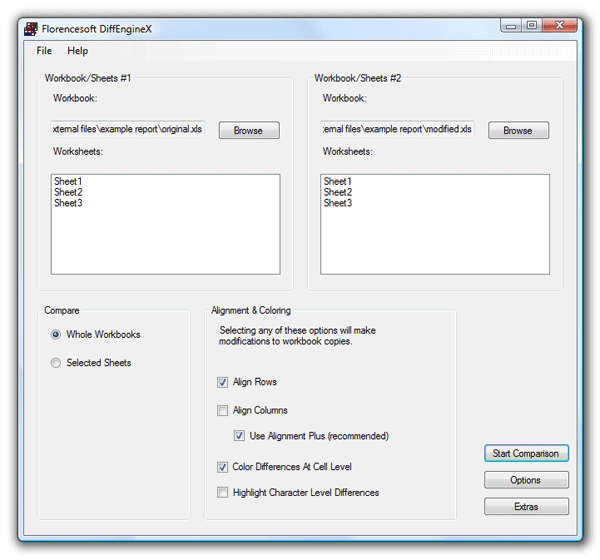
Alignment of rows and/or columns with similar content between sheets (minimizes spurious differences).
Report can group like changes if they are made to adjacent cells (report lists 1 change to a range of cells). This is useful when the spreadsheet contains large blocks of equivalent formulae. Check the option "Compact like changes when contiguous".
Choice of comparing formulae or their calculated values.
Numeric values compared to a user specified number of decimal places. Useful for ignoring small fractional differences.
Numeric differences can be ignored if less than a user specified amount or percentage change.
Difference report created in a new workbook.
Powerful option to highlight precisely the parts of formulae and text constants that differ on the report e.g. =A1+Costs+6 and =A1+NewCosts+4.
Option to add hyperlinks that connect the difference report (often titled Sheet1) to every cell found to differ between two spreadsheets.
Color highlighting of differences, at the whole cell level, made to copies of your workbooks (separate colors for additions, deletions & modifications).
Optional removal of existing workbook color before highlighting added (unconditional fill colour only).
Can optionally hide matching rows enabling convenient discovery of widely separated differences (available on the Extras dialog).
Can hide different rows enabling just the identical ones to be revealed.
Can be run using command-line arguments or from its user interface.
Can be used as a plugin for version control, source control and collaboration systems dealing with Excel workbooks.

 Consider Using Excel's Data-->Sort: When comparing rows of data it is sometimes a good idea to get Excel to sort them before DiffEngineX is used. Select any cell in the data to be sorted. Now select Sort from Excel's Data menu. Make sure you sort on the right number of columns. For example if your data has First and Last name columns you may want to sort on both of them. After sorting save and close your workbooks before using DiffEngineX.
 Align Rows Is Important: If you needed to sort your data first (or if rows have been added/deleted) you need to make sure Align Rows is selected on the main part of DiffEngineX's user interface. After pressing Start Comparison you will be asked to select the columns to align on. For example if your data contains First and Last names you may want to select the columns they correspond to. The idea is to select a column (or columns) that contains unique row identifers.
 Use Alignment Plus: If you are looking to see what rows have been added or deleted, ensure this is selected. By default Align Rows only aligns matching rows. When this is checked, new and deleted rows (these have no match) are explicitly paired with blank rows and so the colors used for additions and deletions are used, instead of the color reserved for modifications. For formulae based spreadsheets, we recommend this option is turned off. If using the command line, specify /alignmentplus:false.
 Comparing Sheets With Different Names: You can only compare worksheets with different names if Selected Sheets is selected and precisely one worksheet is selected in each DiffEngineX list box. When comparing whole workbooks only worksheets with the same names are compared.
 Make The Differences Stand Out: If you are comparing large amounts of data you may want to turn on Hide Matching Rows. This option can be found on the Extras dialog. It is only relevant when Color Differences At Cell Level is also selected.

Compare original and updated versions of your Excel workbooks to find out what data has been changed.
 Compare databases: Import the desired databases into Excel and then compare with DiffEngineX. (Prior sorting required first.)
 Compare CSV (Comma Separated Value) files: Open the CSV files with Excel and save them as Excel workbooks before comparing.
 Management of spreadsheet development: Monitor the development process by examining changes.
 What-if analysis: Create a copy of your Excel workbook, change the values of various inputs and compare it with the original. The affected calculations will be revealed. Note: The option to compare formulae using Their Calculated Values must be turned on first.
 Version Control/Management: Find the differences between old and new versions of the same Excel spreadsheet.
 Check for duplicates (Excel 2007 and above): Create a copy of your workbook or sheet, use Excel's Remove Duplicates functionality under the Data tab and then save the recent changes. When DiffEngineX is used to compare the copy to the original, the duplicates will be highlighted. Make sure to turn on DiffEngineX's Align Rows.

Operating System: Microsoft® Windows® 2000, Windows XP, Windows Vista, Windows 7 or Windows 8
DiffEngineX will not work unless the following is installed: Any version of Microsoft® Excel or Microsoft® Office (all versions from 2000 to 2010)
Fastest performance is achieved with Excel 2002 or later
Summary: Compare Excel workbooks xlsx xlsm & individual worksheets with DiffEngineX. Find differences fast. Row alignment. Uses include source / version control.
Category: Spreadsheet Difference Tool
Product #: 000001
Personal use: $44.00 USD Business use: $100.00 USD